Installation
Ducktion can be installed in multiple ways. The easiest way is to use the Unity Package Manager. You can also download the source code and add it to your project manually. Finally, you can download the package using the Unity Asset Store.
Unity Package Manager
INFO
Using the Unity Package Manager is the easiest way to install Ducktion. The Unity Package Manager provides a way to install packages directly from a Git Repository. This means that you will always get the latest version of Ducktion and don't have to worry about updating the package manually. Also you can easily switch between different versions of Ducktion. When working in a team, the packages will automatically be downloaded for everyone working on the project.
If you add the package using the Unity Package Manager, you will always get the latest version straight from the Git Repository. To add the package using the Unity Package Manager, follow these steps:
In Unity, open the Package Manager window:
Window > Package Manager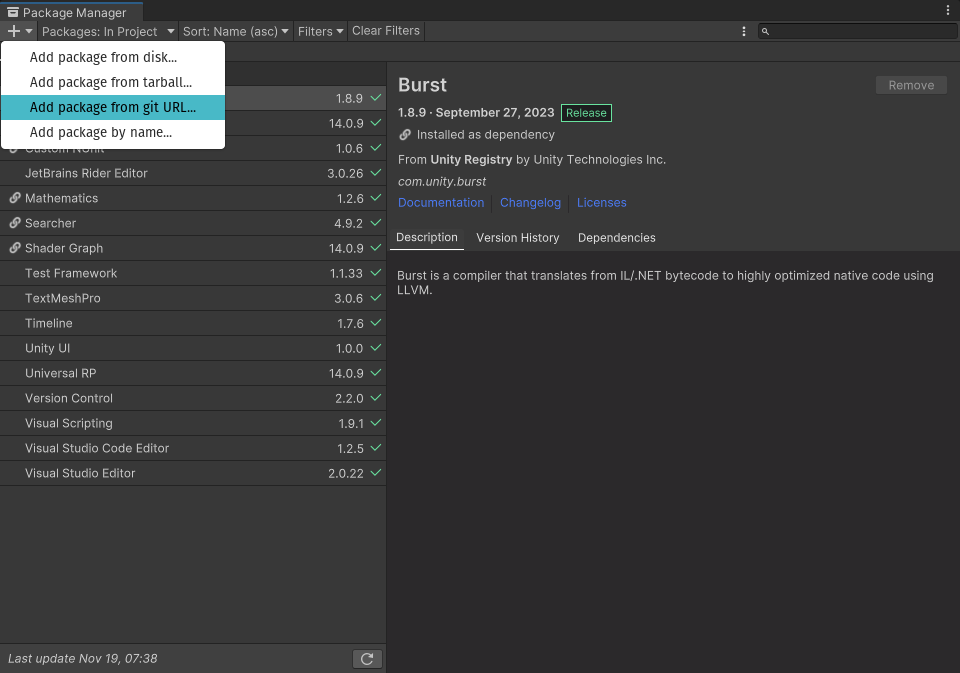
Enter the GIT URL for the Ducktion package:
https://github.com/therealironduck/Ducktion.git:
Press
Addand wait for the installation to finish!
TIP
The steps above will always install the newest available version of Ducktion. If you want to install a specific version, you can specify the version in the URL. For example, to install version 1.0.0, you can use the following URL: https://github.com/therealironduck/Ducktion.git#1.0.0.
Manual Installation
INFO
Manual installation can be useful if you need to modify the source code of Ducktion or don't want to use the Unity Package Manager. However, if you want to use Ducktion in a team, we recommend using the Unity Package Manager.
If you want to install Ducktion manually, you can download the source code from the Git Repository. Once you have downloaded the source code, you can add it to your project by copying the downloaded folder to your project's Assets folder.
Download the source code from the Git Repository
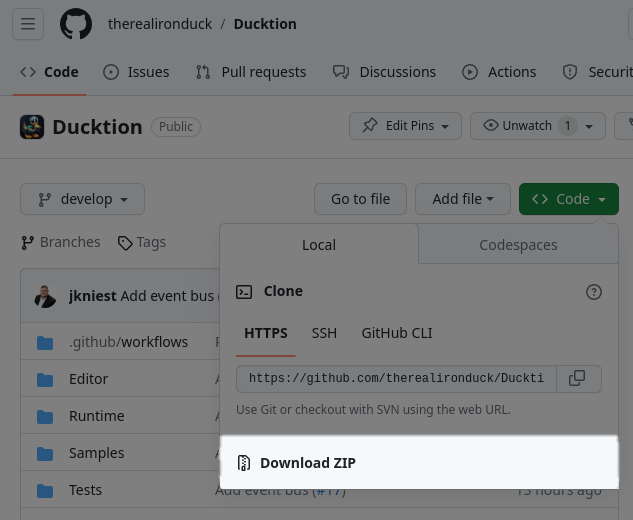
Unzip the downloaded file
Copy the unzipped folder to your project's
Assetsfolder
Unity Asset Store
WARNING
We are currently in the process of submitting Ducktion to the Unity Asset Store. Once the package is available on the Unity Asset Store, we will update this section with instructions on how to install the package using the Unity Asset Store.
Troubleshooting
If anything goes wrong during the installation process, please let us know by creating an issue on the Git Repository. Please include as much information as possible, including the steps you have taken and any error messages you have received.
Next Steps
Now that you have installed Ducktion, you can start using it in your project. To learn more about how to use Ducktion, you may continue here.