
Getting started
Ducktion is a package for Unity3D that provides a simple way to handle dependency injection in your project!
If you are new to dependency injection, you can read more about it here. If you are a visual learner, you can watch this video.
Installation
Ducktion can be installed using the Unity Package Manager. Other installation methods, such as the asset store or manual download can be found here: Installation.
To install Ducktion using the Unity Package Manager, follow these steps:
In Unity, open the Package Manager window:
Window > Package Manager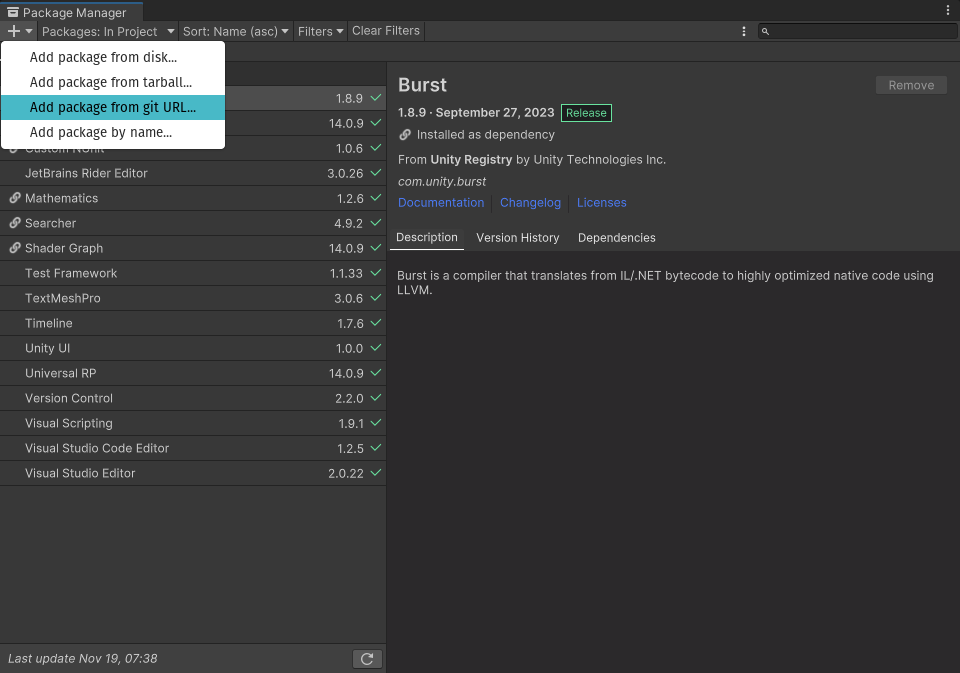
Enter the GIT URL for the Ducktion package:
https://github.com/therealironduck/Ducktion.git:
Press
Addand wait for the installation to finish!
Usage
Ducktion is designed to be as simple as possible to use. You can access the container from any C# script using Ducktion.singleton. If it doesn't exist, it will be created for you!
Accessing services
Let's start by registering a service. A service is a class that you want to be able to access from anywhere using dependency injection. For example, let's say we have a class called Player that we want to access from anywhere in our project.
By default, Ducktion uses 'Auto Resolving', meaning you don't have to manually register your services. Let's see how you can access the Player class from anywhere in your project:
using TheRealIronDuck.Ducktion;

public class MyScript : MonoBehaviour {
    private Player _player;

    private void Start() {
        _player = Ducktion.singleton.Resolve<Player>();
    }
}
It will automatically create an instance of the Player class for you and return it. In addition it will ensure that only one instance of the Player class is created. If you call Resolve<Player>() again, it will return the same instance as before. Of course, you can change this behavior if you want to. See the documentation for more information.
What now?
Ducktion offers a lot of different features and ways to manage your services. For instance, you can register your services manually to have more fine-tuned control over how they are created. See the documentation for more details.
Ducktion also offers an easy-to-use, simple Event Bus system. See the documentation for more details.