Configure the container
Ducktion provides a good default configuration. However, you can customize it to your needs. Every configuration can be set in the editor inspector itself or by using the configure method on the container.
Unity Editor
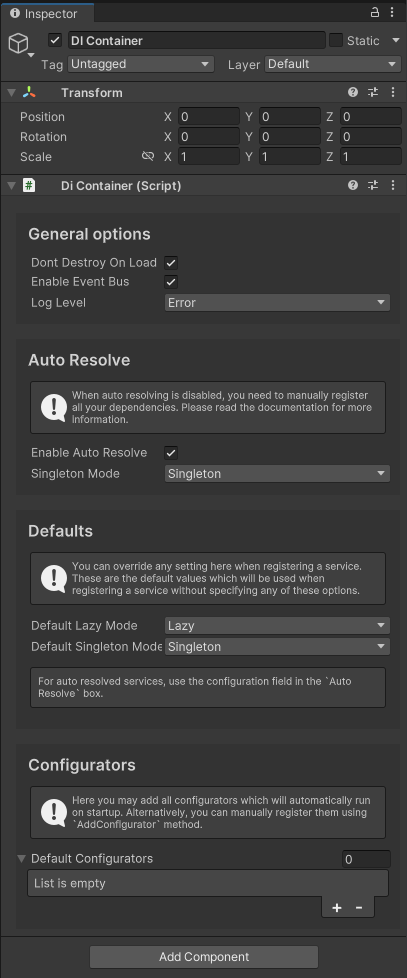
To manually configure the container in the Unity Editor, add a DIContainer component to a game object. There, you should find all configuration options:
Code
To configure the container in code, you can use the configure method on the container:
csharp
using TheRealIronDuck.Ducktion;
using TheRealIronDuck.Ducktion.Enums;
using TheRealIronDuck.Ducktion.Logging;

public class SetContainerConfig : MonoBehaviour
{
    private void Awake()
    {
        Ducktion.singleton.Configure(
            newLevel: LogLevel.Error,
            newEnableAutoResolve: true,
            newAutoResolveSingletonMode: SingletonMode.Singleton,
            newDefaultLazyMode: LazyMode.Lazy,
            newDefaultSingletonMode: SingletonMode.Singleton,
            newEnableEventBus: true,
        );
    }
}
Configuration Options
These are all configuration options:
| Inspector Option | Code Option | Description | Default Value |
|---|---|---|---|
| Dont Destroy On Load | - | Prevents the game object with the DIContainer from being destroyed on scene switch. | true |
| Enable Event Bus | newEnableEventBus | Activates the Event Bus feature for use in your project. | true |
| Log Level | newLevel | Sets the log level for all internal container logs. | Error |
| Enable Auto Resolve | newEnableAutoResolve | Allows the container to automatically resolve unregistered types. | true |
| Singleton Mode | newAutoResolveSingletonMode | Specifies the singleton mode for auto-resolving types. | Singleton |
| Default Lazy Mode | newDefaultLazyMode | Determines the default lazy mode for services that haven't specified their own mode. | Lazy |
| Default Singleton Mode | newDefaultSingletonMode | Defines the default singleton mode for services without a specified mode. | Singleton |
| Default Configurators | - | Lists the Mono DI Configurators for manually registering services. See also Configurator classes. | - |